ROFilter Reverse Osmosis System Design Assistant — Help
Covered: Sign-in / Analysis / Design / Run & Results / Post-treatment / Cost Analysis / Files & Units / MCP Service / Water Tools / FAQ (administrator functions not included)
1. Quick Start (three steps to a result)
- Sign in: enter your account and password. The EN button at the top right switches the interface between Chinese and English.
- Enter water chemistry + design parameters: on the Analysis page enter feed ions plus pH and temperature; on the Design page select membrane elements, then enter recovery and permeate flow.
- Run: click ▶ Calculate at the bottom right of the Design page. The system computes and jumps to the Result page, where you can review pressure, flux, permeate quality, saturation and year-by-year ageing.
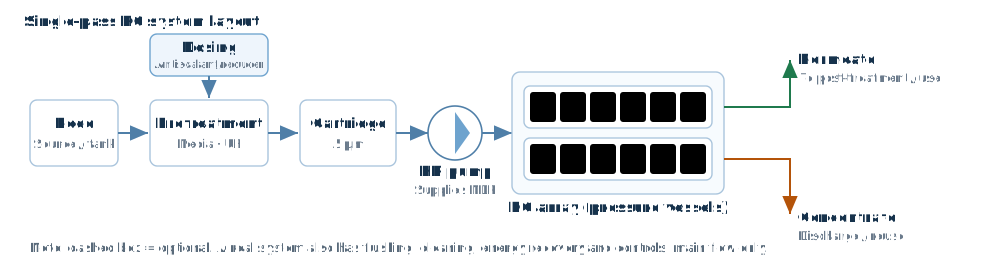
2. Project Information Row (top bar)
Located below the banner menu and shared by all pages:
| Field | Description |
|---|---|
| Project / Client / Engineer | Project archive data; written into the design report. |
| Temp. | Feed temperature; affects osmotic pressure, flux and salt rejection. The unit follows the global unit selection (°C/°F). |
| Water Type | Eight water sources. Determines the design-guideline flux limit and the recommended recovery range; wastewater sources automatically switch the flux-decline mode to “first year”. |
| Pretreatment | Conventional / MF/UF / MF/UF + activated carbon. Turbidity warnings refer to this setting. |
| Date | Defaults to today; written into the report. |
3. Analysis Page — Feed Water
3.1 Ion entry
Enter mg/L concentrations from the water analysis report for cations (Ca/Mg/Na/K/NH4/Ba/Sr) and anions (HCO3/SO4/Cl/F/NO3/PO4/SiO2/B). The mg/L CaCO3 column converts automatically by equivalent weight, and you may also type CaCO3 values to convert back. CO2, CO3, conductivity, NH3 and osmotic pressure are calculated by the system (grey background, italic).
- Ion balance: total meq/L is calculated as you type; when the difference exceeds 10%, click ⚖ Auto Balance (or click an underlined ion name to choose which ion is adjusted).
- Custom ions: pick a built-in slot from the drop-down (Fe/Mn/Cu/Al etc.); the engine carries them through the whole calculation chain.
- Feed Softener: when checked, the feed is treated as softener outlet water (Ca/Mg exchanged for an equivalent amount of Na).
3.2 Water profiles
- 💾 Save Water: export the current water chemistry as a .water file.
- 📂 Load Water: load a .water file.
4. Design Page — System Design
4.1 Design basis (left column)
| Parameter | Description |
|---|---|
| Feed pH | Target feed pH; the difference from the Analysis-page pH drives the chemical dosing calculation. |
| Permeate Recovery % | Typical: single stage ≤50%, two stages 60–75%, three stages up to 80–85%. |
| Permeate Flow | Permeate flow per train. The unit drop-down next to it overrides the global unit for this field only. |
| Average Flux / Feed Flow / Concentrate Flow | Calculated automatically and interlinked (grey background); no input needed. |
4.2 Membrane ageing (right column)
- Membrane Age (years): 0–10 years. Drives “flux decline → fouling factor” and “salt passage increase → salt passage factor”; the Year-by-Year Operation panel on the Result page shows the impact year by year.
- Flux Decline: always a percentage, either %/yr (compound) or %/first year (standard ageing curve).
- Fouling Factor: derived from age and decline rate (0.35–1.0); can also be overridden manually.
4.3 System specification (stage table)
- For each stage enter the element type (click the field to open element selection, where several models can be compared), elements per vessel (1–8) and the number of pressure vessels.
- Auto Arrange back-calculates vessel counts for a target flux of 15 lmh (for example 2:1 for two stages).
- Tick the Permeate Pressure / Inter-stage Booster rows to enter values stage by stage (bar, following the global unit).
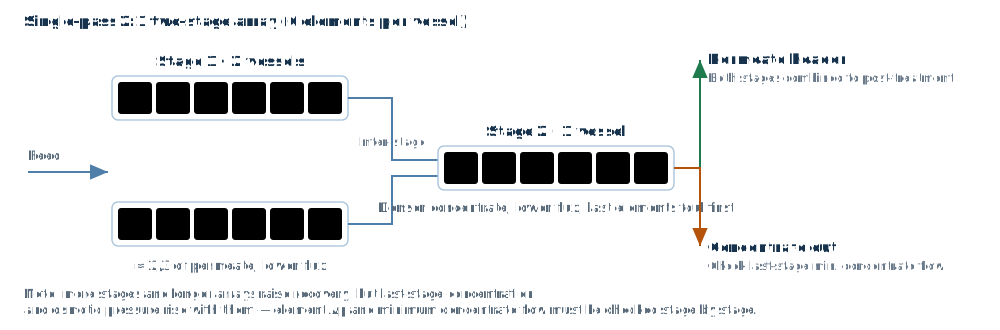
4.4 System panel (right side)
Total permeate flow (automatic), trains, inter-stage pipe loss, feed pressure (manual), permeate blending and concentrate recirculation — each input is enabled by its checkbox.
4.5 Toolbar
| Button | Function |
|---|---|
| ⇉ Two-Pass | Two-pass system (pass 1 permeate becomes pass 2 feed); pass 2 has its own stage table and parameters. |
| ⚡ PE/WE · Turbo | Energy recovery device (ERD) configuration; the Result page then shows recovered power and net power. |
| ⚙ Hybrid | Mixed elements within a stage (two element types blended in a given ratio). |
| 💡 Recommend | Recommends element models and arrangement from water quality, flow and recovery. |
| 📁 Schemes | Loads a typical industry scheme in one click (power, pharmaceutical, electronics, seawater desalination, etc.). |
| ▶ Calculate | Runs the calculation and jumps to the Result page. |
4.6 Elements and concentration decline
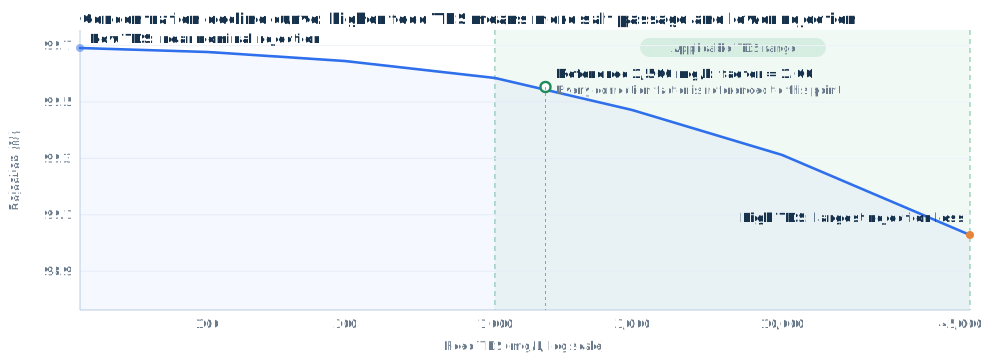
Both permeate flow and salt rejection of an element change with feed salinity: the higher the salinity, the higher the osmotic pressure and the more salt passes through. The software expresses this with a “concentration decline curve” and prefers calibrated elements when recommending models.
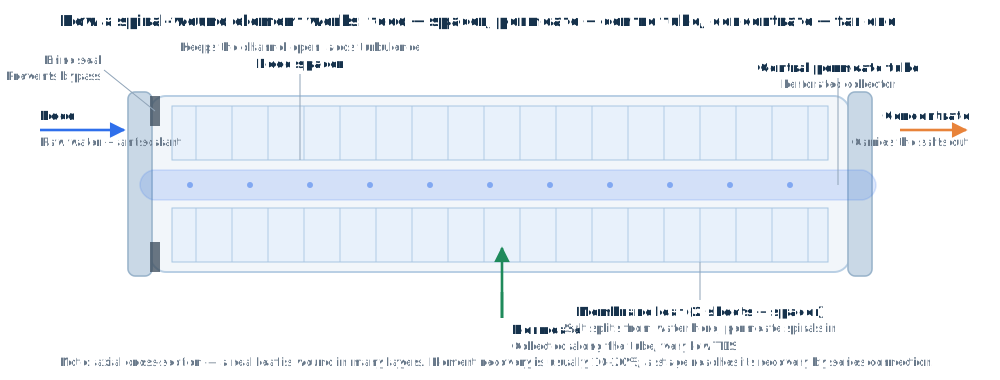
5. Run and Result Page
Top to bottom, the Result page shows: Project Information → System Information → Feature Options → System Flow Diagram → Calculation Summary → Feed and Permeate → Each Pass → Concentrate Saturation → Each Stage → Stage Streams → Element Details → Year-by-Year Operation → Operating Warnings.
- System Flow Diagram: a P&ID-style flow sheet annotated with pressure, flow and TDS; line colours: blue = feed/concentrate, green = permeate.
- Calculation Summary: a narrative summary of the whole report (project / water quality / design / results / saturation / warnings / ageing / conclusion).
- Year-by-Year Operation: rows are years (new membrane → end of life), columns are fouling factor / feed pressure / permeate TDS / pump power, with the change relative to the new membrane in brackets.
- Operating Warnings: automatic checks on feed quality, system design and results (scaling saturation, concentration polarisation β, flux, pressure/temperature/pH limits, flow distribution), graded as severe / warning / notice.
- Click any row of Element Details to open a pop-up with the complete ion profile of that element's feed, concentrate and permeate.
6. Post-treatment Page — Permeate Conditioning
Evaluates conditioning of the permeate from the most recent RO calculation; every input recalculates live:
- Basic water quality (top bar): pH/CO3/CO2/NH3/conductivity can all be entered directly — editing CO2/CO3/NH3 makes the system back-calculate HCO3/NH4 from the equilibrium constants and recompute; alkalinity, ionic strength and osmotic pressure are calculated automatically (click the osmotic pressure value to switch bar ⇄ psi).
- Cation/anion table: both the mg/L and the mg/L CaCO3 columns accept input and convert into each other.
- Post-treatment chemical consumption (transposed panel): per chemical, enter solution concentration % / specific gravity / solution price USD/L; the system estimates consumption (click to switch kg/h ⇄ L/h) and cost in USD/h from the permeate flow. Formula: kg/h = flow (m³/h) × dose (mg/L) ÷ 1000 ÷ concentration (%) × 100.
- Chemical dosing: dose of eight chemicals (NaOH/NaHCO3/Na2CO3/Ca(OH)2/H2SO4/HCl/CO2/NaOCl) as 100% active product; drives the pH, alkalinity and ion increments.
- Degassing: when checked, the CO2 dose equals target outlet CO2 minus current CO2 (a negative value means removal).
- ↺ Reset Dosing: clears all chemicals and returns to the original permeate quality.
7. Cost Analysis Page — Water Production Cost
Estimates the cost per m³ for the current system design. Every change recalculates immediately; no run is needed. The page has five blocks: ① Equipment → ② Membrane elements → ③ Power → ④ Chemicals → ⑤ Total.
7.1 Values pulled in automatically (grey, read-only)
The following come from the Design page and the most recent calculation and cannot be edited here; after changing the design, run again and come back:
| Parameter | Source |
|---|---|
| Permeate capacity per train / trains | Design page “Permeate Flow” and “Trains” |
| Elements per train | Sum of elements over all stages on the Design page (including pass 2, excluding trains) |
| Pump power per train / specific power | Most recent run (including ERD net power); specific power = pump power ÷ permeate per train |
| Acid dosing | Chemical dosing on the Design page; 0 when not enabled |
| System recovery | Recovery on the Design page |
7.2 Economic parameters you fill in
| Block | Parameter | Default | Description |
|---|---|---|---|
| ① Equipment | Investment per Ton | 5000 ¥/(m³/h) | Equipment investment excluding membrane elements (elements are item ②), scaled by permeate capacity |
| Interest Rate | 4.5 % | Used for investment amortisation | |
| Plant Factor | 90 % | Share of the year the plant actually runs | |
| Plant Life | 15 years | Drives membrane replacement count and amortisation | |
| Maintenance Rate | 3 %/yr | Percentage of investment, per year | |
| Investment per train, auto | — | Investment per ton × permeate capacity per train | |
| ② Elements | Average Membrane Price | 2500 ¥/pc | Average purchase price of all elements |
| Membrane Life | 5 years | Amortised over the number of membrane sets needed within plant life | |
| Membrane installations incl. initial | auto | ⌈plant life ÷ membrane life⌉, including the initial installation | |
| Element cost per train incl. initial | auto | elements × unit price × installations | |
| ③ Power | Power Price | 0.8 ¥/kWh | Power cost = specific power × power price |
| Specific Power | auto | Pump power per train ÷ permeate flow per train | |
| ④ Chemicals | Acid Unit Price | 0.15 ¥/kg | Works with the acid dosing on the Design page |
| Antiscalant Dosing / Unit Price | 3 mg/L / 2.2 ¥/kg | Dose concentration converted onto permeate | |
| System Recovery | auto | Chemicals are converted onto permeate by dose concentration, hence the link with recovery | |
| Unit cost independent of trains | — | Trains only affect the total |
7.3 Results and export
- Each block shows ¥/m³ and ¥/yr at the bottom; block ⑤ lists the cost structure as per train and total, the share of each item and the total water cost.
- 📤 Export: export this cost analysis as Excel / Word / PDF; 🖨 Print: print the report or save as PDF.
8. File Menu
| Menu item | Description |
|---|---|
| New Project | Clears everything and restores the defaults (water: only HCO3 = 0.1 / pH 7 / temperature 25; design: stage 1 pre-selected ESPA2-LD with 0 elements and 0 vessels, recovery and permeate flow blank). |
| Save Project (.prj) | Saves project settings + water + design + post-treatment as a local .prj file (calculated results are not included). |
| Load Project (.prj) | Loads a .prj file and restores all of the above; then click Calculate to recalculate. |
| Export Design Report | Exports the current results as Excel (.xlsx, 7 worksheets) / PDF / Word (.docx with the flow diagram); the report mirrors the Result page and includes the operating warnings. |
| Opens the browser print dialog (can be saved as PDF). |
9. Unit System (global)
- Location: System → System Options → Units (listed vertically). Four groups: pressure (bar/psi), flow (m³/h/gpm/gpd/mgd/migd/m³/d/mld), temperature (°C/°F) and flux (lmh/gfd).
- Switching converts globally and instantly without reloading the page: the temperature in the top bar, every pressure/flow input and linked column on the Design page, and all pressure/flow/temperature/flux figures on the Result page.
- The engine always calculates in bar/m³/h/°C/lmh; conversion happens only in the display and input layer. The permeate flow on the Design page can be overridden locally with its own unit drop-down.
- The unit choice is stored in the browser and applies automatically at the next sign-in.
10. MCP Service (for AI clients)
The MCP service lets MCP-capable AI clients such as Claude Desktop and Cursor call this site's calculation engine directly, so that “find an element — analyse water — run a design” can be delegated to the AI. The entry point is the MCP Service button in the top bar.
10.1 Generating and viewing a token
- On first use click Generate token: the plain token is shown in full only that once, so copy it immediately. Afterwards the page shows only the prefix rfmcp_••••; click Show token when you need it again.
- Regenerating makes the old token invalid immediately, and configured clients must be updated (the system asks for confirmation).
- A token is valid for 90 days, with a default daily quota of 1000 calls; the panel shows the values that apply. Tokens issued for administrator accounts do not expire. The panel also shows the account's total call count, today's usage and the per-tool breakdown.
10.2 IP binding and quota
| Quota setting | Behaviour |
|---|---|
| Finite quota (default 1000 calls/day) | The current IP is bound on the first call; requests from other IPs are then rejected with “this token is bound to IP xxx” |
| Unlimited | No IP restriction, suitable when the network changes or calls come from a platform |
10.3 Client configuration
The panel provides a copy-ready configuration snippet to paste into the client's MCP configuration. Key points:
- Transport is Streamable HTTP (the server does not provide an SSE stream); the endpoint is https://rofilter.cn/mcp.
- If the client supports custom headers, send the token as Authorization: Bearer rfmcp_....
- If it does not, the token can be carried in the URL instead (the panel provides that form as well).
10.4 The five available tools
| Tool | Purpose |
|---|---|
| list_elements | Filters elements by brand / family / keyword / TDS and returns area, permeate flow, rejection and test conditions |
| get_element | Returns the full parameters and operating limits (temperature, pH, maximum differential pressure) of one element |
| analyze_water | Computes TDS, osmotic pressure, conductivity, LSI/CCPP and carbonate equilibrium from the ion profile |
| run_design | Runs a complete system design calculation and returns feed pressure, permeate TDS, concentrate concentration, energy and per-stage results |
| list_schemes | Lists typical industry scheme templates (power / pharmaceutical / electronics / food / seawater desalination, etc.) |
11. Water Treatment Tools
Sixteen general-purpose online calculators for water treatment, in five groups:
| Group | Typical tools |
|---|---|
| Membrane and desalination | Membrane MWCO, seawater desalination energy, etc. |
| Wastewater treatment | Activated sludge, MBR, trickling filter, constructed wetland |
| Disinfection and oxidation | Ozone, UV disinfection |
| Environmental water quality | River water quality, etc. |
| General calculation | Common unit and process conversions |
- Entry: the site navigation item Water Tools (/tools.html); no sign-in needed and no MCP quota is used.
- The EN button at the top right switches between Chinese and English; every tool result can be expanded into a chart.
12. FAQ
Q1: Clicking “Calculate” asks for pH / recovery / permeate flow first?
A new project leaves these fields blank on purpose (matching common industry software). Enter valid values; a yellow background marks an empty required field.
Q2: Cations and anions are out of balance and the calculation is blocked?
Click ⚖ Auto Balance or adjust the dominant ions manually; the balance error must be ≤10% before a run is allowed.
Q3: Why do the numbers change after switching to psi/gpm?
Unit switching is an exact conversion (for example 100 m³/h ≈ 440.33 gpm). The engine's basis is unchanged, so the results are physically equivalent.
Q4: After editing CO2 on the post-treatment page the value jumps back?
Once CO2 is entered, the system back-calculates HCO3 from the carbonate equilibrium and recomputes, so the displayed value is the converged equilibrium value. To hold CO2 fixed, use the Degassing outlet target instead.
Q5: The Year-by-Year Operation panel does not appear?
That panel is shown only when Membrane Age on the Design page is greater than 0.
Q6: Does a .prj file contain calculated results?
No. A project file stores inputs only (project settings / water / design / post-treatment); after loading it, click Calculate to recalculate.
Q7: Pump power on the Cost Analysis page is empty, or everything is 0?
Power, element count and permeate capacity on the cost page all come from the most recent run. Click Calculate on the Design page first, then return; if you change the design without re-running, the cost page still holds the previous figures.
Q8: Why can the concentration decline curve only be viewed, not edited?
The curve represents how an element's permeate flow and rejection vary with salinity under the manufacturer's standard test conditions; it is an intrinsic property and is shown read-only. For a custom curve, use the concentration-decline scheme function in the administration area (not available to regular users).
Q9: An MCP call fails with “token bound to IP”?
With a finite quota, a token is bound to the egress IP of its first call and stops working when the network changes. Regenerate the token, or ask the administrator to set the account quota to unlimited (no IP binding then).
Q10: Does the exported design report match the Result page?
Yes. Excel / Word / PDF follow the same structure as the Result page and always include every panel — even panels you hid under System Options → Display Options.